Self-hosted S3.
Single binary. Zero dependencies.
An AWS-compatible object storage server that compiles to a single executable. No Docker, no Java, no external database. Just download and run.
Single Binary
One executable, zero runtime dependencies. No Docker, no JVM, no package managers. Download, chmod, run.
AWS Compatible
Works with AWS CLI, boto3, and every S3 SDK. Your existing tools and scripts work out of the box.
SQLite Powered
No PostgreSQL, no MySQL, no external database to configure. Metadata lives in a single SQLite file with WAL mode.
Use the tools you already know
Cloodsy S3 speaks native S3 protocol. Any SDK, any language, any tool.
# Configure AWS CLI
aws configure set aws_access_key_id AKIAIOSFODNN7EXAMPLE
aws configure set aws_secret_access_key wJalrXUtnFEMI/K7MDENG
aws configure set default.region us-east-1

# Upload a file
aws --endpoint-url http://localhost:9000 s3 cp photo.jpg s3://photos/

# List objects
aws --endpoint-url http://localhost:9000 s3 ls s3://photos/

# Download a file
aws --endpoint-url http://localhost:9000 s3 cp s3://photos/photo.jpg ./download.jpg
import boto3
s3 = boto3.client("s3",
endpoint_url="http://localhost:9000",
aws_access_key_id="AKIAIOSFODNN7EXAMPLE",
aws_secret_access_key="wJalrXUtnFEMI/K7MDENG",
)
# Upload
s3.upload_file("photo.jpg", "photos", "photo.jpg")
# Download
s3.download_file("photos", "photo.jpg", "download.jpg")
# List objects
for obj in s3.list_objects_v2(Bucket="photos")["Contents"]:
print(obj["Key"], obj["Size"])package main
import (
"github.com/aws/aws-sdk-go/aws"
"github.com/aws/aws-sdk-go/aws/credentials"
"github.com/aws/aws-sdk-go/aws/session"
"github.com/aws/aws-sdk-go/service/s3"
)
func main() {
sess := session.Must(session.NewSession(&aws.Config{
Endpoint: aws.String("http://localhost:9000"),
Region: aws.String("us-east-1"),
Credentials: credentials.NewStaticCredentials("AKIAIOSFODNN7EXAMPLE", "wJalrXUtnFEMI/K7MDENG", ""),
S3ForcePathStyle: aws.Bool(true),
}))
svc := s3.New(sess)
// List buckets
result, _ := svc.ListBuckets(nil)
for _, b := range result.Buckets {
fmt.Println(*b.Name)
}
}Everything you need, nothing you don't
Built for developers who want reliable object storage without the operational overhead.
Per-bucket credentials with read-only mode
Each bucket gets its own access key pair. Grant full access or read-only permissions. Revoke credentials without affecting other buckets.
- Isolated credentials per bucket
- Read-only access mode
- AWS Signature v4 authentication
# Create full-access credential
$ ./cloodsys3 credential create photos
✓ Access Key: AKIA...
✓ Secret Key: wJal...

# Create read-only credential
$ ./cloodsys3 credential create photos --readonly
✓ Access Key: AKIA... (read-only)
# Upload a 2GB file — multipart happens automatically
$ aws --endpoint-url http://localhost:9000 \
s3 cp large-backup.tar.gz s3://backups/
upload: ./large-backup.tar.gz to s3://backups/large-backup.tar.gz
# Multipart: 200 parts, 10MB eachMultipart uploads up to 5TB
Full multipart upload support for large files. Automatic part management, resumable uploads, and configurable part sizes.
- Up to 10,000 parts per upload
- Part sizes from 5MB to 5GB
- Atomic completion with integrity checks
Presigned URLs for secure sharing
Generate time-limited URLs to share objects without exposing credentials. Works with GET and PUT operations for downloads and direct uploads.
# Generate a presigned download URL (1 hour)
url = s3.generate_presigned_url(
    "get_object",
    Params={"Bucket": "photos", "Key": "vacation.jpg"},
    ExpiresIn=3600,
)
print(url)  # Share this link — no credentials needed
# Set a 10GB quota on a bucket
$ ./cloodsys3 bucket update photos --quota 10GB
✓ Quota set: 10 GB
# Check usage
$ ./cloodsys3 bucket info photos
Name: photos
Objects: 1,247
Size: 3.2 GB / 10 GB (32%)Bucket quotas to control storage
Set maximum storage limits per bucket. Monitor usage and prevent runaway storage consumption with hard quota enforcement.
Runs everywhere
From a $35 Raspberry Pi to a bare-metal server. Single binary, every platform.
Linux x86_64
Servers & VMs
Linux ARM64
AWS Graviton, Ampere
Raspberry Pi
ARMv7 & ARM64
macOS
Intel & Apple Silicon
How Cloodsy S3 stacks up
Purpose-built for simplicity. No cluster overhead, no consensus protocols.
| Feature | Cloodsy S3 | MinIO | Garage | SeaweedFS |
|---|---|---|---|---|
| Single binary | ✓ | ✓ | ✓ | — |
| No external database | ✓ | ✓ | ✓ | — |
| Memory usage <50MB | ✓ | — | ✓ | — |
| Per-bucket credentials | ✓ | ✓ | ✓ | — |
| Multipart upload | ✓ | ✓ | ✓ | ✓ |
| Presigned URLs | ✓ | ✓ | ✓ | ✓ |
| Bucket quotas | ✓ | ✓ | — | ✓ |
| Runs on Raspberry Pi | ✓ | — | ✓ | — |
| SQLite metadata | ✓ | — | — | — |
| Distributed mode | — | ✓ | ✓ | ✓ |
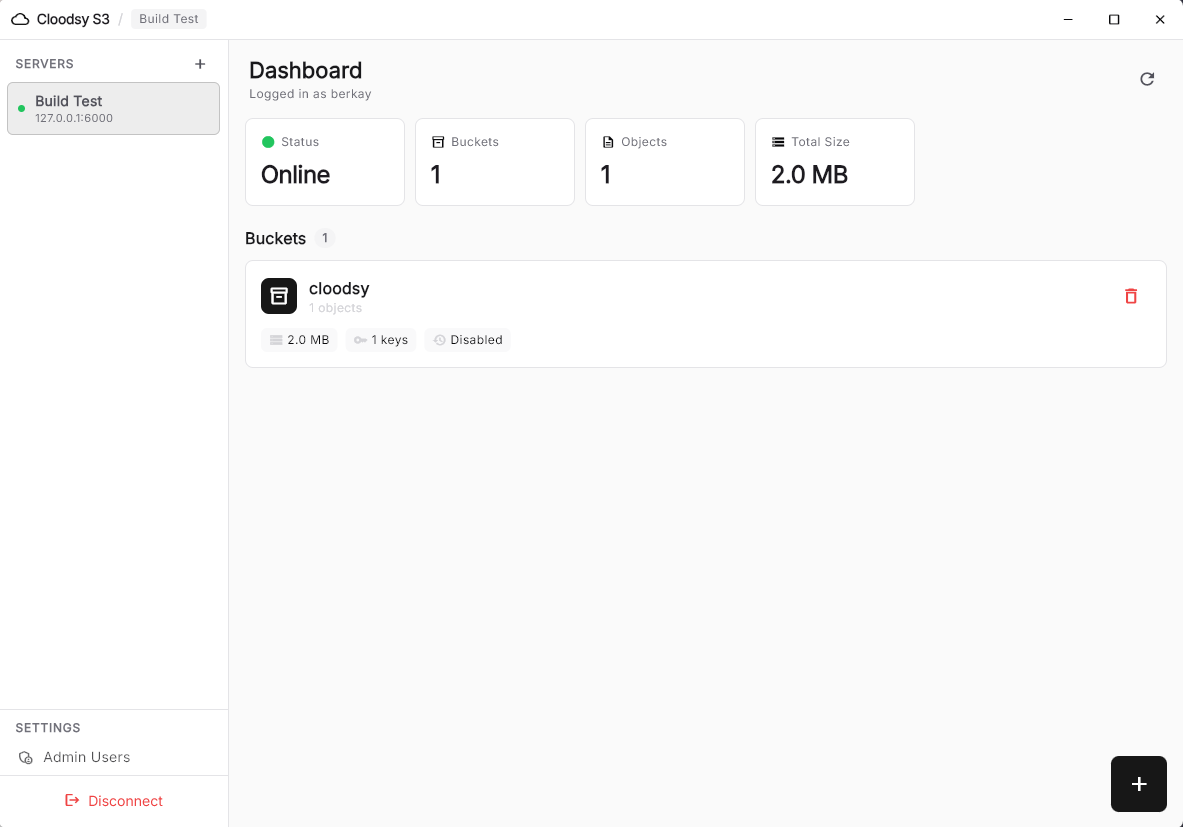
Prefer a GUI?
Cloodsy S3 GUI is a beautiful admin interface for managing your S3 servers. Connect to multiple servers, manage buckets, browse files, configure credentials — all from a desktop or mobile app.
Get started in 30 seconds
Download the binary, create a bucket, start serving. It really is that simple.